Wednesday, August 23, 2006

Iterators in c# 2.0

In C# 1.1, you can iterate over data structures such as arrays and collections using a foreach loop.
string[] cities = {"New York","Paris","London"};
foreach(string city in cities)
{
Console.WriteLine(city);
}
In fact, you can use any custom data collection in the foreach loop, as long as that collection type implements a GetEnumerator method that returns an IEnumerator interface. Usually you do this by implementing the IEnumerable interface:
public interface IEnumerable
{
IEnumerator GetEnumerator();
}
public interface IEnumerator
{
object Current{get;}
bool MoveNext();
void Reset();
}
Often, the class that is used to iterate over a collection by implementing IEnumerable is provided as a nested class of the collection type to be iterated. This iterator type maintains the state of the iteration. A nested class is often better as an enumerator because it has access to all the private members of its containing class. This is, of course, the Iterator design pattern, which shields iterating clients from the actual implementation details of the underlying data structure, enabling the use of the same client-side iteration logic over multiple data structures, as shown in Figure 1.


Figure 1


Figure 1 Iterator Design Pattern
In addition, because each iterator maintains separate iteration state, multiple clients can execute separate concurrent iterations. Data structures such as the Array and the Queue support iteration out of the box by implementing IEnumerable. The code generated in the foreach loop simply obtains an IEnumerator object by calling the class's GetEnumerator method and uses it in a while loop to iterate over the collection by continually calling its MoveNext method and current property. You can use IEnumerator directly (without resorting to a foreach statement) if you need explicit iteration over the collection.
But there are some problems with this approach. The first is that if the collection contains value types, obtaining the items requires boxing and unboxing them because IEnumerator.Current returns an Object. This results in potential performance degradation and increased pressure on the managed heap. Even if the collection contains reference types, you still incur the penalty of the down-casting from Object. While unfamiliar to most developers, in C# 1.0 you can actually implement the iterator pattern for each loop without implementing IEnumerator or IEnumerable. The compiler will choose to call the strongly typed version, avoiding the casting and boxing. The result is that even in version 1.0 it's possible not to incur the performance penalty.
To better formulate this solution and to make it easier to implement, the Microsoft .NET Framework 2.0 defines the generic, type-safe IEnumerable and IEnumerator interfaces in the System.Collections.Generics namespace:
public interface IEnumerable
{
IEnumerator GetEnumerator();
}
public interface IEnumerator : IDisposable
{
ItemType Current{get;}
bool MoveNext();
}
Besides making use of generics, the new interfaces are slightly different than their predecessors. Unlike IEnumerator, IEnumerator derives from IDisposable and does not have a Reset method.
The second and more difficult problem is implementing the iterator. Although that implementation is straightforward for simple, it is challenging with more advanced data structures, such as binary trees, which require recursive traversal and maintaining iteration state through the recursion. Moreover, if you require various iteration options, such as head-to-tail and tail-to-head on a linked list, the code for the linked list will be bloated with various iterator implementations. This is exactly the problem that C# 2.0 iterators were designed to address. Using iterators, you can have the C# compiler generate the implementation of IEnumerator for you. The C# compiler can automatically generate a nested class to maintain the iteration state. You can use iterators on a generic collection or on a type-specific collection. All you need to do is tell the compiler what to yield in each iteration. As with manually providing an iterator, you need to expose a GetEnumerator method, typically by implementing IEnumerable or IEnumerable.
You tell the compiler what to yield using the new C# yield return statement.

You can also use C# iterators on non-generic collections.
In addition, you can use C# iterators on fully generic collections. When using a generic collection and iterators, the specific type used for IEnumerable in the foreach loop is known to the compiler from the type used when declaring the collection—a string in this case:
LinkedList list = new LinkedList();
/* Some initialization of list, then */
foreach(string item in list)
{
Trace.WriteLine(item);
}
This is similar to any other derivation from a generic interface.
If for some reason you want to stop the iteration midstream, use the yield break statement. For example, the following iterator will only yield the values 1, 2, and 3:
public IEnumerator GetEnumerator()
{
for(int i = 1;i< 5;i++)
{
yield return i;
if(i > 2)
yield break;
}
}
Your collection can easily expose multiple iterators, each used to traverse the collection differently. For example, to traverse the CityCollection class in reverse order, provide a property of type IEnumerable called Reverse:
public class CityCollection
{
string[] m_Cities = {"New York","Paris","London"};
public IEnumerable Reverse
{
get
{
for(int i=m_Cities.Length-1; i>= 0; i--)
yield return m_Cities[i];
}
}
}
Then use the Reverse property in a foreach loop:
CityCollection collection = new CityCollection();
foreach(string city in collection.Reverse)
{
Trace.WriteLine(city);
}
There are some limitations to where and how you can use the yield return statement. A method or a property that has a yield return statement cannot also contain a return statement because that would improperly break the iteration. You cannot use yield return in an anonymous method, nor can you place a yield return statement inside a try statement with a catch block (and also not inside a catch or a finally block).

Friday, August 18, 2006

CLS and Non-CLS Exception

All programming language for the CLR must support the throwing of Exception derived object because the CLS mandate this. However, the CLR actually allows an instance of any type to be throw, and some programming language will allows code to throw non-CLS-compliant exception object such as a string,Int32 whatever.The c# comiler allows code to throw only Exception-derived objects,whereas code written in IL assembly language and C++/CLI allow code to throw Exception-derived objects as well as objects that are not derived from Exception.

Prior to version 2.0 of the CLR, when programmers wrote catch blocks to catch exception, they were catching CLS-compliant exceptions only. If a c# method called a method written in another language, and that method threw a non-CLS-compliant exception,the C# code would not catch this exception at all.

In version 2.0 of the CLR, Microsoft has introduced a new RuntimeWrappedException class.This class is derived from Exception,so it is a CLS-compliant type.The RuntimeWrappedException class contain a private field of type object.In version 2.0 of the CLR,when non-CLS-compliant exception is throw, the CLR automatically constructs an instance of the RuntimeWrapperdException class and initialize its private field to refer to the object that was actually throw.

private void TestMethod()
{
try
{
// some code
}
catch(Exception e)
{
//Before c# 2.0, this block catches CLS-compliant exception only
// In C# 2.0 this block catches CLS and non CLS compliant exceptions
throw;
}
catch
{
// in all version of C# this block catches CLS and non CLS compliant exceptions
}
}

If the above code is recompiled for CLR 2.0, the second catch block will never execute ,and the c# compiler will indicate this by issuing a warning: "CS1058: A previous catch clause already catches all exceptions.All non- exceptions will be wrapped in a System.Runtime.CompilerServices.RuntimeWrappedException."

There are two ways for developer to migrate code from an eariler version of .Net Framework to version 2.0:

1. You can merge the code from the two catch block into a single catch block.
2. You can tell the CLR that the code in your assembly wants to play by the old rules.That is tell the CLR that you catch blocks should not catch an instance of the new RuntimeWrappedException calss.
[assembly:RuntimeCompatibility(WrapNonExceptionThrows = false)]

Monday, August 07, 2006

Features of Ado.Net 2.0

1. Bulk Copy Operation

Bulk copying of data from a data source to another data source is a new feature added to ADO.NET 2.0. Bulk copy classes provides the fastest way to transfer set of data from once source to the other. Each ADO.NET data provider provides bulk copy classes. For example, in SQL .NET data provider, the bulk copy operation is handled by SqlBulkCopy class, which can read a DataSet, DataTable, DataReader, or XML objects.

Binary.BinaryFormatter format = new Binary.BinaryFormatter ();
DataSet ds = new DataSet();
ds = DataGridView1.DataSource
using FileStream fs = new FileStream(("c:\sar1.bin", FileMode.CreateNew")
ds.RemotingFormat = SerializationFormat.Binary

In this code snippet, we are serializing the dataset into filestream. If you look at the file size difference between XML and Binary formating, XML formating is more than three times bigger than Binary formating. If you see the perfomance of Remoting of DataSet when greater than 1000 rows, the binary formating is 80 times faster than XML formating

2. DataSet and DataReader Transfer

In ADO.NET 2.0, you can load DataReader directly into DataSet or DataTable. Similarly you can get DataReader back from DataSet or DataTable. DataTable is now having most of the methods of DataSet. For example, WriteXML or ReadXML methods are now available in DataTable also. A new method "Load" is available in DataSet and DataTable, using which you can load DataReader into DataSet/DataTable. In other way, DataSet and DataTable is having method named "getDataReader" which will return DataReader back from DataTable/DataSet. Even you can transfer between DataTable and DataView.

SqlDataReader dr ;
SqlConnection conn = new SqlConnection(Conn_str);
conn.Open() ;
SqlCommand sqlc = new SqlCommand("Select * from Orders", conn);
dr = sqlc.ExecuteReader(CommandBehavior.CloseConnection)
DataTable dt = new DataTable("Orders");
dt.Load(dr)

3. Data Paging

Now command object has a new execute method called ExecutePageReader. This method takes three parameters - CommandBehavior, startIndex, and pageSize. So if you want to get rows from 101 - 200, you can simply call this method with start index as 101 and page size as 100.

SqlDataReader dr ;
SqlConnection conn = new SqlConnection( Conn_str);
conn.Open()
SqlCommand sqlc = new SqlCommand("Select * from Orders", conn);
dr = sqlc.ExecutePageReader(CommandBehavior.CloseConnection, 101, 200)

4. Multiple Active ResultSets


Using this feature we can have more than one simultaneous pending request per connection i.e. multiple active datareader is possible. Previously when a DataReader is open and if we use that connection in another datareader, we used to get the following error "Systerm.InvalidOperationException: There is already an open DataReader associated with this connection which must be closed first". This error wont come now, as this is possible now because of MAR's. This feature is supported only in Yukon.

5. Batch Updates


In previous versions of ADO.NET, if you do changes to DataSet and update using DataAdapter.update method. It makes round trips to datasource for each modified rows in DataSet. This fine with few records, but if there is more than 100 records in modified. Then it will make 100 calls from DataAccess layer to DataBase which is not acceptable. In this release, MicroSoft have changed this behaiour by exposing one property called "UpdateBatchSize". Using this we can metion how we want to groups the rows in dataset for single hit to database. For example if you want to group 50 records per hit, then you need to mention "UpdateBatchSize" as 50.

Wednesday, August 02, 2006

Checked and Unchecked Primitive Type Operations

Programmers are well aware that many arthmetic operation on primitives could result in an overflow:
Byte b =100;
b = (Byte)(b+200);

In most programming scenarios, this silent overflow is undesirable and if not detected causes the application to behave in strange and unusual ways.In some rare programming scenariosthis overflow is not only acceptable but is also desired.

The CLR offer IL instructions that allows the compiler to chose the desire bhaviour.The CLR has an instruction called add that adds to values together.The add instruction performs no overflow checking.The CLR also has an instruction called add.ovf that also add two values together. However add.ovf theows a System.OverflowException if an overflow occur.CLR also has similar IL instruction for Subtraction,multiplication and data conversion.

C# allows the programmer to decide how overflows should be handled.By default, overflow checking is turned off. This means that comipler generate IL code by using the versions to add that don't include overflow checking. As a result the code run faster but developer must be assured that overflow won't occur .

One way to get the C# complier to control overflow is to use the /Checked+ compiler switch. This switch tell the comipler to generate code that has the overflow checking versions of add.

Rather than have overflow checking turned on or off globally, programmers are much more likely to want to decide case by case whether to have overflow checking.C# allow this flexibility by offering checked and unchecked operators.

Byte b = 100;
b = checked(Byte(b+200)); // overflow exception is throw
or
checked
{
Byte b =100;
b += 200;
}
}

Tuesday, August 01, 2006

CLR Event Model


The common Language runtime event model is based on delegates.A delegates is a type-safe way to invoke a callback method. Callback methods are the means by which objects receive the notification they subscribed to.
To help you fully understand the way event work within the CLR,I'll start with a secnario in which events are useful.Suppose you want to design an e-mail application.When an e-mail message arrives,the user might like the message to be forwarded to a fax machine or a pager.
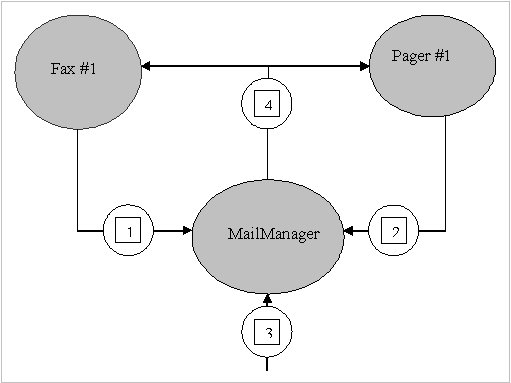
In architecting this application,let's say that you'll first design a type,called MailManager,that receives the incoming e-mail message. MailManager will expose an event called NewMail. Oter type(such as Fax and Pager) may register interest in this event. When MailManager receives a new e-mail message,it will raise the event,causing the message to be distributed each of the registered objects.

When the application intializes,let's instantiate just one MailManager instance-the application can then instantiate any number of Fax and Pager Type.Above figure shows how the application initializes and what happen when a new e-mail message arrive.

The application intializes by constructing an instance of MailManager. MailManager offer a NewMail event.When the Fax and Page objects are constructed, they register themselves with MailManager's NewMail event so that MailManager knows to notify the Fax and Pager objects when new e-mail message arrive.

Step # 1 : Define a type that will hold any additional information that should be sent to receivers of the event notification

internal class NewMailEventArgs : EventAgrs
{
private readonly string m_from,m_to,m_subject;
public NewMailEventArgs(string from,string to,string subject)
{
m_from = from;
m_to = to
m_subject = subject;
}

public string from
{
get
{
}
return m_from;
}

public string To
{
get
{
}
return m_to;
}

public string Subject
{
get
{
}
return m_subject;
}


Step # 2 :Define Event member

internal class MailManager
{
publiuc event Eventhandler NewMail;
......
}

Step # 3: Define a method responsible for raising the event to notify registered objects that the event has occured

internal class MailManager
{
protected virtual void onNewMail(NewMailEventArgs e)
{
EventHandler temp = NewMail;
if(temp != null)
{
temp(this,e);
}
}
}

Step #4 : Define a method that translates the input into the desired event

internal class MailManager
{
public void SimulateNewMail (string from,string to,string subject)
{
NewMailEventArgs e = new NewMailEventArgs(from,to,subject);
onNewMail(e);
}
}


Designing a Type That Listen for an Event

internal class Fax
{
public Fax(MailManager mm)
{
mm.NewMail += FaxMsg;
}

private void FaxMsg(object sender, NewMailEventArgs e)
{
Console.writeLine("From{0} , To{1}, Subject{2}", e,from,e.to,e.Subject);
}

public void Unregister(MailManager mm)
{
mm -= FaxMsg;
}

}

Monday, July 31, 2006

Asynchronous Task

Asp .Net 2.0 give different way of executing task Asynchronous out of which one way is Registering AsynTask method.
RegisterAsyncTask is an alternative way to execute task asynchronously in Asp.Net page.RegisterAsyncTask is an API that is,to some exten,independent from asynchronous pages.In fact, it also work when the Async attributes of the @Page directive is set to false.Combined with asynchronous pages,though,it forms an extemely powerful programming model for lengthly operations.
You can use RegisterAsyncTask to register one or more asynchronous tasks.Tasks start when the page reach the async point- that is, immediately after the preRender event.

void Page_Load(object sender,EventArgs e)
{
PageAsyncTask task = new PageAsyncTask (new BeginEventHandler(BeginTask),new EndEventHadler(EndTask),null,null);
RegisterAsyncTask(task);
}

To call RegisterAsyncTask, you need to first create an instance of the PageAsyncTask class.The Constructor accepts up to five parameters
PageAsyncTask let you specify a timeout function and an optional flag to enable multiple registered tasks to execute in parallel.

The timeout delegate indicate the method that will get called if the task is not completed within the aysnchronous timeout interval.By default,an asynchronous task time out if not completed within 45 seconds.You can indicate a different timeout in either the configuration file or the @Page directive.Here's what you need if you opt for the web.config file


The @Page directive contains an integer AsynTimeout attribute that you set to the desire number of seconds.

Tuesday, July 25, 2006

Customized display of collection data in a PropertyGrid

If you assign array in PropertyGrid ,you'll see that propertyGrid display all the objects contained within that array.
for e.g
- Person
Name
Address
Age

An object may provide custom information about itself by implementing an interface ICustomTypeDescriptor. This interface can be used to provide dynamic type information. This is the case for a Collection object to return its content appearing as properties in a PropertyGrid

If ICustomTypeDescriptor is not used, then a static TypeDescriptor will be used at runtime, which provides type information based on the meta data obtained via reflection.

TypeConverters can also be used for more complex objects, such as classes, where the properties can be exposed at design-time. One of the ways to achieve this is through the ExpandableObjectConverter class. This class is a TypeConverter that creates a plus/minus sign box that can expand/contract the group of properties within that class.

Public Class HighlightingTypeConverter : ExpandableObjectConverter

Than you can override ConvertFrom and ConvertTo function . ConvertFrom Converts string to Highlighting class object and ConvertTo Converts highlighting class object to string value.

public override object ConvertFrom(ITypeDescriptorContext context,
CultureInfo culture, object value)

public override object ConvertTo(ITypeDescriptorContext context,
CultureInfo culture, object value, Type destinationType)

What is most important in ConvertFrom is that the value is converted to a string array by using the Split() method to break apart the string. We've defined the "@" character as a separator for the text. It can be a single character, multiple characters, or different characters separating each field.

string[] strValues = value.ToString().Split("@".ToCharArray())

Then you can assign this splited value to the properties of your class

ButtonAttribute btnsettings = new ButtonAttribute ();
TypeConverter typeColor;
typeColor= TypeDescriptor.GetConverter(typeof(Color));
btnsettings .BackColor = (Color)cvColor.ConvertFrom(context, culture,
strValues [0]);
return btnsettings;

and in case ConvertTo you have to convert the value into object.

ButtonAttribute btnsettings =(ButtonAttribute)value;
TypeConverter cvInt;
cvInt = TypeDescriptor.GetConverter(typeof(int));
TypeConverter cvColor;
cvColor = TypeDescriptor.GetConverter(typeof(Color));
// Create the string
string[] parts = new string[NumOfMembers];
parts[0] = (string)cvColor.ConvertTo(settings.BackColor, typeof(string));
parts[1] = (string)cvColor.ConvertTo(settings.ForeColor, typeof(string));
return String.Join(culture.TextInfo.ListSeparator, parts);

return base.ConvertTo(context, culture, value, destinationType);

Wednesday, July 19, 2006

Internal Structur of the GAC

The Purpose of GAC is to maintain relationship between a strongly named assembly and a subdirectory. Basically, the CLR has an internal function that take an assembly's name,version,culture,and public key token. This function then return the path of a subdirectory where the specified assembly's file can be found.
If you go to the command propmt and change to the %SystemRoot%\Assembly directory, you'll see the GAC actually spans multiple subdirectories. On my machine, I see the fo;;owing GAC-related directories:
c:\windows\Assembly\GAC
c:\windows\Assembly\GAC_MSIL
c:\windows\Assembly\GAC_32
c:\windows\Assembly\GAC_64

The c:\windows\Assembly\GAC directory contains the assemblies that were created for versions 1.0 and 1.1 of the CLR.These assemblies may contains entirely of managed code(IL), or the assemblies may contain managed and native x86 code.

The c:\windows\Assembly\GAC_MSIL directory contains the assemblies that were created for version 2.0 of the CLR.These assemblies consits entirely managed code.Assemblies in this subdirectory can run in a 32-bit or 64-bit address space therefore, they can rn on a 32-bit or 64-bit version of Windows.

The c:\windows\Assembly\GAC_32 directory contains the assemblies that were created for version 2.0 of the CLR.These assemblies contain managed code as well as native x86 code.Assemblies in this subdirectory are allowed to run only in a 32-bit address space and therefore, they can run on an x86 version of windows or using the Windows On Windows64
technology running on a 64-bit version of windows.

The c:\windows\Assembly\GAC_64 directory contains the assemblies that were created for version 2.0 of the CLR. These assemblies contain managed code as well as native x64 code. Assemblies in this subdirectory are allowed to run on in a 64-bit address space,and therefore, they can run only on on a 64-bit version of windows.

Wednesday, July 12, 2006

NEW Modules & Handlers in Asp net 2.0

In ASP.NET, requests are passed from the Web server through an Internet Server Application Programming Interface (ISAPI) filter and on to the actual ASP.NET runtime

When IIS receives a request, the extension is mapped to an ISAPI filter according to the IIS settings. The extensions .aspx, .asmx, .asd, and others are mapped to the aspnet_isapi.dll which is simply an ISAPI filter that launches the ASP.NET runtime. Once a request hits the ASP.NET runtime, it starts at the HttpApplication object, which acts as the host for the ASP.NET Web application. The HttpApplication object:

  1. Reads the machine and application level configuration files
  2. Passes the request through one or more HttpModule instances. Each HttpModule provides a service such as session maintenance, authentication or profile maintenance. These modules pass the request back to the HttpApplication.
  3. Passes the request to an HttpHandler based on the verb and the path. The verb refers to the HTTP verb used in the request (GET, POST, FTP, etc.) and the path refers to a URL within the application. Depending on how the handlers are configured, the request may be processed as an ASP.NET page (System.Web.UI.Page is an implementation of IHttpHandler), or the request may trigger another action such as batch-compilation of all Web pages (precompilation.asd triggers the PrecompHandler).


In ASP.NET 2.0, this model stays intact. However several new modules and handlers have been added to provide additional services. As with ASP.NET 1.x, you can extend, replace or reconfigure any of the module or handler classes in order to provide your own custom functionality.


New Modules
Naturally, new HttpModules have been added to support the new services offered in ASP.NET 2.0. Specifically, an ASP.NET application with default module settings will include new modules for:
SessionID—The session identification mechanism has been split off the ASP.NET 1.x Session module in order to provide greater control over cookies, URL rewriting and other forms of session ID generation.
Role Management—A new module has been added for providing role based services in support of the new user identification mechanisms. This module helps link ASP.NET applications to the role based security built into the .NET framework.
Anonymous Identification—The new personalization features support anonymous users. This module helps keep track of which features an anonymous user can access and how these features are maintained between requests.
Profile Management—The profile module links to the new profile service and helps provide user specific persistent data storage.

New Handlers
In addition to the new modules, ASP.NET 2.0 introduces new handlers to support the application configuration tools and other new features such as the batch compilation request. The most important of the new handlers include the ".axd" family which process Website administration requests. These handlers launch the internal administration tools that allow developers to configure ASP.NET users as well as other settings. The administrative handlers include:
Web Administration—The WebAdminHandler is the main page for the administrative Website. This handler provides the starting point for administering ASP.NET 2.0 Web applications.
Trace—The ASP.NET 1.x TraceHandler has been improved and is the only "axd" handler that was available in ASP.NET 1.x.
Web Resources—Web resources can now be configured post-deployment thanks to the new administrative tool and the WebResourcesHandler.
Cached Images—The CachedImageServiceHandler provides support for caching graphical components.
Precompile—As mentioned earlier, the PrecompHandler can be used to batch compile all of the ASPX pages in an ASP.NET application.
Web Part Export—The WebPartExportHandler provides support for storing and transferring Web Part layouts. Web Parts are a new mechanism for personalizing the look and contents of a portal style Web application.
As always, the HttpForbiddenHandler is linked to any file type that should never be returned. In ASP.NET 2.0, the list of forbidden file types has been expanded to include master pages, skin files and other new developer components

Tuesday, July 11, 2006

Code Access Security

This installment of .NET Nuts & Bolts is part one of a two-part series exploring code access security and how it is controlled by the Microsoft .NET Framework. The Microsoft .NET Framework includes a number of security features that assist you in developing secure applications. The security system, which is a fundamental part of the common language runtime (CLR), controls execution of .NET code. It includes handy features such as the following:Type safety enforcement, which eliminates the potential for buffer overruns Arithmetic error trapping, which detects the potential for underflows and overflows In addition, the .NET Framework provides the concept of evidence-based security. Evidence-based security works on top of the security provided by the operating system. For example, it works on top of Win32 security but is not a replacement for Win32 security. While Win32 is based on the user, the evidence-based security is based on the assembly. It gathers and presents information (or evidence) about the assembly to the security system, which then determines whether or not to allow the code to execute. For example, if code tries to read a file during execution, the security system verifies that the assembly has the required permissions and either grants access or throws a SecurityException.Evidence about an assembly can be controlled and influenced through things like strongly named assemblies, Authenticode signatures, or other custom information. Evidence is mapped to permissions through security policies, which rely on permission sets, code groups, and policy levels (enterprise, machine, and user settings) to achieve the mapping. Policies can be deployed throughout your organization through the Active Directory, but this discussion doesn't get into the specifics of that.

.NET has two kinds of security:

  1. Role Based Security
  2. Code Access Security

The Common Language Runtime (CLR) allows code to perform only those operations that the code has permission to perform. So CAS is the CLR's security system that enforces security policies by preventing unauthorized access to protected resources and operations. Using the Code Access Security, you can do the following:

  1. Restrict what your code can do
  2. Restrict which code can call your code
  3. Identify code

Code Access Security consists of following item

  1. Permissions
  2. Permissions Sets
  3. Code Groups
  4. Evidence
  5. Policy

Permissions

Permissions represent access to a protected resource or the ability to perform a protected operation. The .NET Framework provides several permission classes, like FileIOPermission (when working with files), UIPermission (permission to use a user interface), SecurityPermission (this is needed to execute the code and can be even used to bypass security) etc.

Permission sets
A permission set is a collection of permissions. You can put FileIOPermission and UIPermission into your own permission set and call it "My_PermissionSet". A permission set can include any number of permissions. FullTrust, LocalIntranet, Internet, Execution and Nothing are some of the built in permission sets in .NET Framework. FullTrust has all the permissions in the world, while Nothing has no permissions at all, not even the right to execute.

Code groups
Code group is a logical grouping of code that has a specified condition for membership. Code from http://www.somewebsite.com/ can belong to one code group, code containing a specific strong name can belong to another code group and code from a specific assembly can belong to another code group. There are built-in code groups like My_Computer_Zone, LocalIntranet_Zone, Internet_Zone etc. Like permission sets, we can create code groups to meet our requirements based on the evidence provided by .NET Framework. Site, Strong Name, Zone, URL are some of the types of evidence.

Policy
Security policy is the configurable set of rules that the CLR follows when determining the permissions to grant to code. There are four policy levels - Enterprise, Machine, User and Application Domain, each operating independently from each other. Each level has its own code groups and permission sets.

Wednesday, July 05, 2006

DataBinding in VS2003

In the .Net Framework, any object that implements the IList interface can be data provider.
This not onlyt inludes ADO.Net object, such as DataSet,DataView,DataTable, but also more mundane objects such as array or collection.
In previous Data Access technologies, a cursor was used to manage data currency. As the cursor moved,the current record changed and bound control were updates.Because Data access in Ado.Net is fundamentally disconnected, there is no concept of a database cursor Rather, each data source has an associated CurrencyManager that keeps track of the current record.CurrencyManager objects are managed through a form's BindingContext object.
The CurrencyManager objects keeps track of the current record for a particular data source. There can be multiple datasource in an application at one time,and each datasource maintain its own CurrencyManager.
You can use PositionChanged event of the CurrencyManager to disable back and forward buttons when the end of the record list is reached.

For e.g

public void onPositionChanged(object sender, EventArgs e)
{
if(this.BindingContext[DataSet1.Customers].Position == 0)
BackButton.Enabled = false;
if(this.BindingContext[DataSet1.Customers].Position == DataSet1.Tables["Customers"].Rows.Count -1)
ForwardButton.Enabled = false;
}

Tuesday, July 04, 2006

CAPTCHA


CAPTCHA an acronym for "completely automated public Turing test to tell computers and humans apart" trademarked by Carnegie Mellon University) is a type of challenge-response test used in computing to determine whether or not the user is human


Origin
Since the early days of the Internet, users have wanted to make text illegible to computers. The first such people were hackers, posting about sensitive topics to online forums they thought were being automatically monitored for keywords. To circumvent such filters, they would replace a word with look-alike characters. HELLO could become -3__() or )-(3££0, as well as numerous other variants, such that a filter could not possibly detect all of them. This later became known as "13375p34k" (leetspeak).
The first discussion of automated tests which distinguish humans from computers for the purpose of controlling access to web services appears in a 1996 manuscript of Moni Naor from the Weizmann Institute of Science, entitled "Verification of a human in the loop, or Identification via the Turing Test". Primitive CAPTCHAs seem to have been later developed in 1997 at AltaVista by Andrei Broder and his colleagues in order to prevent bots from adding URLs to their search engine. Looking for a way to make their images resistant to OCR attack, the team looked at the manual to their Brother scanner, which had recommendations for improving OCR's results (similar typefaces, plain backgrounds, etc.). The team created puzzles by attempting to simulate what the manual claimed would cause bad OCR recognition. In 2000, von Ahn and Blum developed and publicized the notion of a CAPTCHA, which included any program that can distinguish humans from computers. They invented multiple examples of CAPTCHAs, including the first CAPTCHAs to be widely used (at Yahoo!).

Some Implementation bugs
Some poorly designed CAPTCHA protection systems can be bypassed without using OCR simply by re-using the session ID of a known CAPTCHA image.[3] Sometimes, if part of the software generating the CAPTCHA is client-sided (the validation is done on a server but the text that the user is required to identify is rendered on the client side), then users can modify the client to display the unrendered text, etc.

For More Detail how to do it in Asp.Net 2.0
See this link http://www.codeproject.com/aspnet/CaptchaNET_2.asp

Monday, July 03, 2006

My Experience in Windows Form

Hi I believe
working in window form is much easier than working in web forms.